How To Tips
SHELF TAG SUPPLY offers a wide variety of products and supplies which mark, tag, identify and locate products and storage areas to help improve warehouse efficiency, labor productivity, and cost reduction.
To help you determine "how to" design and place signs, design and display bar codes, select dry erase versus damp erase marking, mount label holders, and print your own data cards, we have provided a series of tips
Tip #1 - Warehouse Signs
Tip #2 - Warehouse Bar Code Labels
Tip #3 - Applying Freezer Labels
Tip #4 - Warehouse Dry Erase Markers vs Damp Erase Pens
Tip #5 - Warehouse Label Holder Mounting
Tip #6 - Printing Data Cards
Tip #7 - Sign Assembling and Mounting Instructions:
TIP #1 - WAREHOUSE SIGNS
Designing Warehouse Signs:
You know you need some signs – How big? How will they layout? Letter sizing? Also, see our Warehouse Sign Checklist to review various sign requirements - this list is especially helpful for setting up a new warehouse facility.
1. Reading Distance
Start by determining the how far away people will be (farthest point) when they need to read the sign. To determine the required character size for your sign letters and numbers, a rule of thumb for readability is to utilize 1 inch of character height for every 8 feet of distance. Example: maximum distance to read the sign is 24', so the minimum character size should be 3"H. Lighting and other environment factors may affect readability, so we recommend testing a character size in the worst case location. Also, consider any character colors that may be utilized as additional indicators. The sign material (background color) is usually white or sometimes bright yellow.
2. Number of Characters per Sign
Once you know the required character height, determine how many letters and /or numbers you will need across the width of the sign. Use 86% of the character height as an estimate for the width of a character including spacing. For example: if you need four 3" high characters, then your sign should be at least 10.3" wide (4 x 3 x 86%). We can fudge this a bit by compressing the character width; so in this example we should choose a 10" minimum width. We can compress character width even more, up to about 60% of height, but you end up with characters that are real tall and skinny and are not very easy to read. It is best to stay close to the normal character width.
3. Height of Sign
Now determine the sign height – add a minimum of 20-25% of the character height for space between rows of characters, a top margin, and a bottom margin. So in our example, if you had two rows of 3" characters, you would need a sign at least 8.25" high. Again, you can "fudge" a bit, so either an 8"x10" or 10"x10" sign face would do nicely.
4. Mounting and Hanging
Review the location where the sign is to be displayed. The sign can be mounted to your racks, crossbeams, doors and frames with foam adhesive tape, magnetic strips or pre-drilled holes for using nuts and bolts or rivets. For optimal adhesion, the surface should be clean and dry. Dirty, dusty, oily and damp surfaces will significantly reduce bounding of mount or holder to the surface. If needed, clean surface with a 50/50 mix of isopropyl alcohol and water, and then let dry. When mounting, apply firm pressure across the bonding area. Hanging signs are generally suspended from overhead beams, conduit or cables above open areas and attached using our lightweight jack chain.
5. List Sign Contents
Now that you have designed the sign specifications, just list the characters to be applied to each sign or the sequences of locations, numbers or codes for all the signs. Provide this list via online (see the sign quote form for the sign type you selected), fax or email and we will respond with a quick quote back to you.
6. Sign Creation
All signs are custom made-to-order. We will computer precision cut the color vinyl for your characters and apply them to all the signs per your specifications. See examples of both text and color graphics - Letters, Numbers, Graphics. Use dark color characters (such as black) on light color material (white, yellow) or use light color characters (such as white) on darker material (blue, green, red).

Unless the sign is very simple or a re-order, we will make the first sign for each style ordered and quickly send it to you for your approval. This is to ensure your complete satisfaction with the design and style. Once approved, we will make and ship the balance of your order generally in two weeks or less.

TIP #2 - WAREHOUSE BAR CODE LABELS
Designing a Bar Code Label:
Bar code labels come in all sizes, shapes and uses. We will concern ourselves in this section with the type used for shelf, rack and bin labeling in manufacturing concerns and warehouses. The primary considerations are accurate scans and ease of verifying the correct location or product code by reading the human readable information on the label.
1. Review Software and Hardware
Using information from your software provider and scan gun provider, coupled with the distance at which to scan and the character set to be utilized in your coding scheme, determine the type of barcode and the required barcode density (mil size) for the distance from where you will need to scan.
2. Bar Code Width
Determine the approximate width of the bar code including "dead zones" at the start and finish. Make the bar code pattern as high as allowed so you do not need to be as exact in hitting a narrow target when aiming the gun.
3. Human Readable Layout
The human readable portion should display the bar code information, as well as other important information such as product descriptions, etc., in an easy to read format. Break up a long location/part code or SKU into component sections, such as aisle-column-level-position separated by spaces, so you can read each section quickly at a glance. It is often helpful to add colored background boxes behind alternating sections of the human readable information to allow reading individual sections more easily.
4. Code Layout
Layout the various bar code components on the label with the goal of easy and quick scanability. Remember to allow for the "dead zones" at the beginning and end of the bar code pattern.
Popular Warehouse Bar Code Styles:
The bar code style you choose will generally be determined by the particular software package or scan gun that you are using or by the character set that you must include in the bar code. The specification sheet for your scan gun will generally list the various bar code types it will decode. The most common styles in warehousing and manufacturing are Code 39, Code 128 (USS-128) and Interleaved 2 of 5. Each of these coding styles is described below. Common to most codes are leading and following "dead zone" spaces, start and stop characters, and check characters. Much of the information on the three styles below was derived from Astro-Med, Inc. materials and is to be considered as "Copyright, Astro-Med, Inc., Used with Permission."
1. Code 39
The most commonly used bar code style, the Code 39 character set includes digits 0 through 9, upper-case letters A through Z and some special characters (,.$/+% and space). Lower case letters may also be encoded, but an extra character is added for each extending the length of the barcode pattern. Each character is represented by 9 elements – five bars and 4 intervening spaces. For each character, exactly 3 of the 9 elements are wide and 6 are narrow – hence the term Code 39 or Code 3 of 9.
2. Code 128 (USS-128)
There are three types of this bar code style varying by the character set they can represent:
Code A – includes all standard upper case alphanumeric keyboard characters as well as the control and special characters
Code B – includes all standard uppercase and lowercase alphanumeric keyboard characters as well as the special characters
Code C – includes the characters 0 through 9 and special characters only; all of the characters are combined into two character sets(00 through 99) for encoding which allows the bar code to be much shorter than the above two types
Each character or character set consists of three bars and three spaces, each being one of three widths.
3. Interleaved 2 of 5
The character set includes numerals 0 through 9 only and characters are encoded as pairs so the number of characters must be an even number (including the check digit) or a leading zero will be added to make the number of characters even. Each character pair consists of five bars and five spaces in two widths.
Scanning Distance Gun to Label:
The distance at which a given label can be scanned depends on several factors: the type of scan gun, the mil size (density) of the bar code, the label material, the bar code contrast, and the ambient lighting and glare. Mil width is the width of the narrowest bar in the code set measured in thousands of an inch (mils).
1. Existing Scanning Guns
If you already have a scan gun, or if a type of gun is specified by your software system provider, then the specs for that gun will determine the bar code design necessary for a given scan distance. Each manufacturer will have a spec sheet containing a table listing bar code type, mil width (density) of barcode, label material (regular or retroreflective) and scan distance ranges.
Example:
A Symbol LS 3200ER Extended Range Scanner lists the following barcode mil widths and ranges:
| 7.5 mil | ~ | 10 inches |
| 10 mil | ~ | 13 inches |
| 15 mil | ~ | 4 feet |
| 20 mil | ~ | 5 feet |
| 40 mil | ~ | 11 feet |
| 55 mil | ~ | 15 feet |
| 70 mil retro-reflective | ~ | 25 feet |
| 100 mil retro-reflective | ~ | 35 feet |
Retro-reflective label material is like that used in traffic signs and is the label material utilized for longer scan distances with compatible long-range scan guns.
Examples of spec sheets for
an Intermec Scanner and Computer can be found at:
Intermec example 1:
Intermec example 2:
See the second page of these
specs for the mil range tables.
2. New Scanning Guns
Links to some popular scanner manufacturers' websites are:
Symbol Technologies
Intermec
Wasp
Bar Code Label Size:
The width of a bar code for a given number of characters depends on the bar code style chosen and the mil width of the narrowest bar. The wider the mil width, the greater the scan distance (subject to the scan gun's specifications).
1. Sample Code Widths
Following are some approximate widths for representative bar code types and a six character (123456) code. Each includes the "dead zone" light space at both ends and check characters where applicable:
| Width | Code 39 | Interleaved 2 of 5 | Code 128-C | Code 128-A |
| 12 mil | 2.0" | 1.3" | 1.2" | 1.6" |
| 21 mil | 3.4" | 2.2" | 2.0" | 2.8" |
| 42 mil | 6.8" | 4.3" | 4.2" | 5.6" |
| 54 mil | 8.7" | 5.4" | 5.3" | 7.3" |
| 72 mil | 11.6" | 7.2" | 7.0" | 9.7" |
| 99 mil | 16.0" | 9.9" | 9.7" | 13.3" |
2. Width for an Additional Character
Approximate (very rough estimate) bar code length extension for one additional character:
| Width | Code 39 | Interleaved 2 of 5 | Code 128-C | Code 128-A |
| 12 mil | .20" | .10" | .08" | .15" |
| 21 mil | .70" | .18" | .29" | .51" |
| 42 mil | 1.16" | .62" | .44" | .88" |
Submitting Bar Codes to Us:
To have us produce bar code labels for you, use your existing product location data and submit it to us in a spreadsheet format (Excel preferred). This can be provided via email - spacer.gifUpload Your File at Contact Us for data submission.
1. Label Spreadsheet Instructions
a. Place data in one row for each label
b. Sequence rows in the same order in which you want your labels to be provided
c. For each data element to be printed separately on the label, place it in its own column
Ex #1 - simple: Barcode Human Readable
Ex #2 - complex: BC HR Sec Aisle Row Level Level Color Arrow Dir
d. Select barcode symbology (code 128, code 39, etc.)
e. Use applicable characters for data (alphanumeric, upper/lower case, etc.) and text descriptor for use of colors, arrow directions, etc.
(do NOT use colored cell boxes, arrow symbols, or other graphics)
f. Do NOT include unneeded characters ( ", #, *, ( ), -, =, :, etc.) or any blank spaces before, within or after the data stream - the barcode and the human readable data will print exactly as it is provided to us
2. Sample Spreadsheet Layout
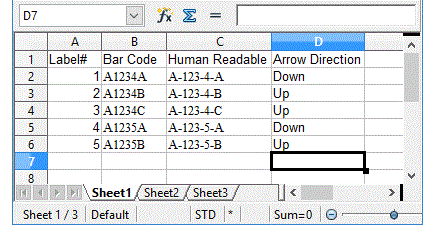
For additional examples, see Label Data Files
TIP #3 - APPLYING FREEZER LABELS
Guidelines for Successful Application:
The instructions below apply only to our Custom Warehouse Labels with special adhesive. These labels can be applied in freezer temperatures of -10° and above. We recommend testing a sample label prior to placing your full order.
1. Surface Preparation
The rack should be a powder coated steel, stainless steel or aluminum shelving material in an environment of down to -10°. The surface must be free of any grease, oil, food residue, dirt or other contaminants other than normal frost. If cleaning is necessary, ensure the cleaning agent is thoroughly rinsed and removed.
2. Label Application
Briskly rub the rack surface in an area slightly larger than the label to remove frost and moisture using a clean, dry towel. Immediately remove the label liner and apply to the rack. If re-positioning is needed (within 5 minutes of initial placement), carefully peel label and re-apply.
TIP #4 - DRY ERASE MARKERS VS DAMP ERASE PENS
Which One to Choose?
Select the appropriate marker or pen when writing on labels, holders, mounts, signs, boards and other surfaces in your warehouse.
1. Dry Erase Markers
A Dry Erase Marker writes on a dry erase compatible surface and can be removed by just rubbing off with a tissue or dry rag. This marker type is generally used where you are constantly writing information down, erasing and writing new information. If left for long periods of time, weeks to months, it probably will not erase cleanly without the aid of dry erase cleaning fluid and may leave "ghost marks" on the dry erase surface.
2. Damp Erase Pens
A Damp Erase Pen writes on a damp erase compatible surface and can be removed using a damp tissue or cloth. For most warehouse applications, damp erase is preferred - so if someone just brushes against the writing, it doesn't come off as it would with dry erase – it must be removed with a damp tissue. Usually if a surface is dry erase compatible, it can also be used with damp erase inks.
TIP #5 - WAREHOUSE LABEL HOLDER MOUNTING
Choosing the Right Mounting Method:
We offer the industry's widest range of standard and optional backings and mounting methods for our bar code label and product location card holders. For optimal adhesion,the surface should be clean and dry. Dirty, dusty, oily and damp surfaces will significantly
reduce bounding of mount or holder to the surface. If needed, clean surface with a 50/50 mix of isopropyl alcohol and water, then let dry. When mounting, apply firm pressure across the bonding area.
1. Magnetic Strip
Strips of flexible brown magnet are generally .06" thick and ½" to 2" wide and are used depending on the style of holder being mounted. We also use .12"thick strip for more demanding applications like our larger magnetic aisle signs. Higher energy (for greater magnetic holding power) magnetic strip is available on special order.
2. Full Magnetic Back
A solid magnetic backing, utilized on our Rack and Shelf Label Holders, is constructed of a rectangular sheet of .03 inch thick flexible magnet adhered on the back. The magnet covers the entire back surface of the label holder with a low profile and superior mounting strength.
3. Foam Adhesive Strip
Strips of plastic foam tape with a permanent adhesive are generally .03 inches thick and ½" to 1" wide. The foam allows adhesion to slightly irregular surfaces. We also carry a high tack foam tape in a .06" thickness for applications requiring greater initial tack and conformance to more irregular surfaces. This style is recommended for new powder coated shelving components to which the normal
foam tape may not adequately bond.
4. Full Adhesive Back
A solid adhesive backing, utilized on our Rack and Shelf Label Holders, the entire back side surface of the vinyl pocket is a permanent adhesive allowing both a low profile and superior holding power.
5. Velcro® Hook and Loop
We can affix strips of hook or loop to the back of your label holder. Mating strips of hook or loop are affixed to the rack or shelving allowing the label holder to be mounted securely in place, but easily moved to another location. Velcro® mounted holders can not be bumped out of position like a magnet. A strip of loop material can be mounted along the entire length of the shelf and label holders placed anywhere along that length and moved freely.
6. Plastic Cinch Straps
Plastic Ties & Cinch Straps are available in 3", 8" and 14" lengths to affix label holders, signs to objects and surfaces, and to connect several items together.
7. Plastic Snap Rings
¾" diameter Snap Rings are useful when you may wish to move the label holder from time to time - they easily snap on and off bars on your racks or in and out of holes in your bins.
8. Holes for Attachment
Grommet holes for screws, bolts, rivets, and other connectors are available in many of our products including Grommet-Style Pouches, Job Ticket & Card Holders, and Wire Rack Card Holders. Additionally, most signs can be specified with holes for mounting where appropriate.
Use Microsoft Excel to Print Your Product and Location Data:
These instructions will enable you to easily set-up your data card page layout by using our standard size data card templates or by creating your own card template. Click on this Printing Perforated Card Sheets link to go to the instructions page.
TIP #7 - SIGN ASSEMBLING & MOUNTING INSTRUCTIONS
Angled Sign Hanging Instructions
Printable Instructions
1. Rotate open end of S-hook through hole until closed end (attached to chain) touches the back side of the sign.
2. Crimp the open end to close the S. IMPORTANT: Make sure the crimped ends are to the back of the sign. Failure to do so will crack the plastic and lead to possible falling.
Dual Angled Sign Assembly Instructions
Printable Instructions
Each sign has three section (sides) with only the top section having holes
1. Insert hanging clips (from bottom up) into holes provided in top section.
2. Align other two sides with text upright.
3. Remove adhesive backings (liners) and press sections firmly together.
4. Signs of 18" and longer may require edge stiffeners - slide onto top sign section only.
End-of-Rack Sign Assembly Instructions
Printable Instructions
Assembly instructions also apply for Three-View Angled Projection Wall Signs
1. Remove adhesive strip backing (liner) and align left and right sides.
2. Place signs together and press firmly along adhesive strip.
Triangular & Cube Sign Assembly Instructions
Printable Instructions
Due to their size, these signs are shipped flat and simple assembly is required.
Follow the same procedure for both trianglar and cube signs.
1. On a flat surface (desk, table), set one sign face (side) upright just as it will hang to be read. Remove the adhesive tape backing liner.
2. Set next sign face upright on its edge - make sure both faces have their lettering facing out. Be certain both faces are standing flat on the surface and attach first face to second.
3. Repeat procedure for remaining faces to form a triangle or cube. Sign should rest flat on all sides when faced are attached correctly.
4. Insert S-hooks (at end of hanging chain) into the hole in each side.
5. Hang the sign from the overhead structure using additional chain, heavy duty fishing line, etc.
Sign Edge Stiffener Assembly Instructions
Printable Instructions
Stiffeners are to be placed on the top edge of triangular and cube signs, and on the long side (generally 18" or longer) of flat signs.
1. Carefully pry open one end of the stiffener and insert the sign edge at one end. Work the stiffener down onto the entire sign edge.
2. The stiffener should be nearly flush with the sign corner at both ends and not extend beyond the sign end. If the stiffener needs adjusting, remove and re-apply.